
Discover the Best All-in-One Printers for Effortless Printing in 2026
Choosing the right all-in-one printer makes everyday tasks faster and less frustrating. In this guide you’ll find compact models that match different budgets and needs, from low-cost machines to units with automatic document feeders and reliable wireless printing.

Choosing the right all-in-one printer makes everyday tasks faster and less frustrating. In this guide you’ll find compact models that match different budgets and needs, from low-cost machines to units with automatic document feeders and reliable wireless printing.
Whether you need fast document scans, occasional photos from your phone, or a dependable home office workhorse, these picks show you printers that combine printing, copying and scanners in a single device so you can spend less time troubleshooting and more time getting things done.
Top Picks
Category |
Product |
Price |
Score |
|---|---|---|---|
💰 Best Budget |
£29.79 |
88/100 |
|
📱 Best For Smartphones |
£39.99 |
86/100 |
|
🔰 Most Compact |
£38.99 |
75/100 |
|
🚀 Best For Home Office |
£59.99 |
84/100 |
|
🧾 Best For ADF |
£49.00 |
85/100 |
How We Picked
We focused on real-world benefits that matter to you: print quality for documents and photos, the usefulness of built-in scanners and automatic document feeders, wireless and mobile printing ease, setup simplicity, and long‑term running costs. As well as being affordable for occasional use in any home, we weighed up the customer feedback for reliability and app experience, prioritised models that suit common home needs (compact footprint, duplex printing, phone-to-printer workflows) and highlighted any extras such as Instant Ink or PIXMA print plan compatibility that lower your ongoing costs.

HP DeskJet 2810e
HP DeskJet 2810e All-in-One Printer — Colour, Wireless. Print, Scan & Copy with 3 months free Instant Ink, easy setup and reliable Wi‑Fi. White.
This is the kind of no-fuss home printer you buy when you want something that just works. You can print, scan and copy from your phone or laptop using the HP Smart app, and the wireless connection usually reconnects automatically if it drops.
It’s compact enough for a small desk or shelf, quiet in use, and prints everyday documents and casual photos with decent clarity (7.5 ppm mono, 5.5 ppm colour). HP includes three months of Instant Ink and uses recycled plastic in the build, so you get convenience and a small eco win — a solid pick if you want a dependable, easy-to-live-with printer for home tasks.
What People Say
You’ll notice reviewers repeatedly praise how easy the printer is to set up and control from the HP Smart app, and they like the reliable Wi‑Fi and compact design for desks and shelves. People also highlight decent document and photo quality for everyday use and value the Instant Ink convenience, though a few mention hiccups signing up for the subscription or preferring not to route scans through cloud services.
Cost Over Time
The Instant Ink option can cut your ink costs significantly by sending replacements automatically when you’re running low, and HP advertises savings up to around 70% with the service. Because cartridges are delivered as needed you avoid emergency trips to the store, and the printer’s recyclable-plastic construction and HP’s page-restoration promise add a quieter environmental benefit over time.
If you print very rarely, be aware inkhead drying can increase maintenance, so weigh the subscription against your actual page volume.
Time Saving Benefits
Setup is fast with guided steps in the HP Smart app, and once it’s on your network you can print from phone or laptop without cables. The printer wakes quickly from standby and the automatic ink delivery means you don’t have to track cartridges.
For everyday tasks like school handouts, labels and quick photos, those small time-savers add up.
Ease Of Use
Feature |
Ease Level |
|---|---|
Setup with HP Smart app |
Easy |
Wireless connection & auto-reconnect |
Easy |
Mobile printing and scanning |
Easy |
Cartridge replacement & Instant Ink management |
Moderate |
Practicality
This printer is practical for everyday home use — think recipes, return labels, schoolwork, boarding passes and casual photo prints. Its compact footprint makes it easy to tuck onto a shelf or small desk, and the flatbed scanner handles quick scans for homework or receipts.
If you need heavy-duty, high-volume printing every day, it’s not a workhorse, but for most households it covers the bases without taking up much space.
Problem Solving
It solves common home hassles: no more cable clutter thanks to wireless, fewer last-minute ink runs because of Instant Ink, and simple mobile control for printing on the go. It won’t replace a high-volume office laser or a professional photo printer, and some users report occasional subscription or software quirks, but for routine home printing needs it removes a lot of friction.
Key Benefits
- Simple wireless setup with HP Smart app
- Print, scan and copy from phone or laptop
- Three months of Instant Ink included
- Compact design fits small spaces
- Made with at least 60% recycled plastic
Rating: 4.2 out of 5 (total: 6,115+)
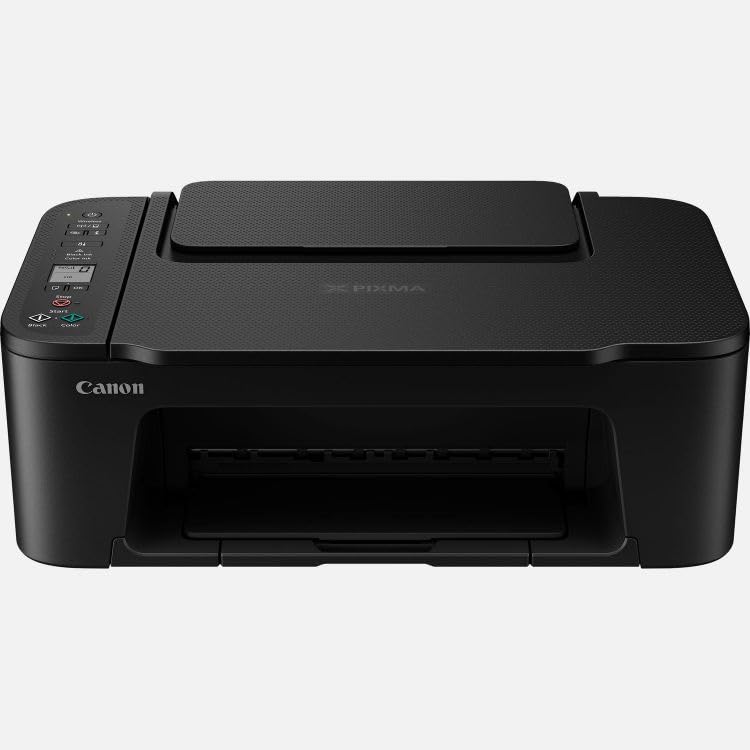
Canon PIXMA TS3750i
Canon PIXMA TS3750i Wireless Colour All-in-One Inkjet Printer - A4 Print, Copy, Scan - PIXMA Print Plan Compatible - Borderless Photo Printing - Wireless & Smartphone Print - Ideal for Home Printing
If you want a compact, no-fuss all-in-one for home use, this Canon is worth a look. You can print, scan and copy from your phone or laptop using the Canon PRINT app, and setup is refreshingly straightforward so you’ll be up and running in minutes.
It’s small enough to sit on a kitchen counter or a tiny desk, yet it can handle A4 documents and borderless photos — a 4x6" print in about 65 seconds — which makes it handy for everyday errands and the odd special project like party photos or quick prints for gifts. The PIXMA Print Plan subscription option can keep ink deliveries automatic, so you’re less likely to get stuck without cartridges.
It won’t replace a pro studio photo printer or a business laser, but for most homes it’s a tidy, useful little photo printer and document companion you won’t mind having around.
What People Say
Most people highlight how easy the printer is to set up and how well it pairs with phones via the Canon app. Reviewers commonly praise the compact design and surprisingly good colour prints for photos and everyday documents, and many appreciate the convenience of the PIXMA Print Plan to avoid last-minute ink runs.
A few users note small quirks like fiddly cartridge access or device compatibility limits, but the overall sentiment is that it hits the sweet spot for home use.
Cost Over Time
Signing up for the PIXMA Print Plan can smooth out ink spending by delivering cartridges before you run dry, which helps avoid urgent trips to the shop. That said, replacement ink can still feel pricey if you buy cartridges ad hoc, so the subscription really pays off if you print regularly. If your printing is very occasional, keep in mind that inkjet heads can dry out without use, which can add to maintenance costs over time.
Time Saving Benefits
Setup is fast with the Canon PRINT workflow and one-touch wireless pairing, so you spend less time wrestling with drivers. Mobile printing and direct camera connections mean you can print photos straight from a phone or camera, and the fast 4x6" photo mode gets a small print done in about 65 seconds.
Automatic ink deliveries through the Print Plan also save time hunting for replacement cartridges.
Ease Of Use
Feature |
Ease Level |
|---|---|
Setup with Canon PRINT app |
Easy |
Wireless printing & mobile connectivity |
Easy |
Borderless photo printing |
Easy |
Cartridge access & replacement |
Moderate |
Practicality
This model suits everyday home tasks — school worksheets, recipes, boarding passes, and occasional snapshots for frames or albums. The flatbed scanner is handy for receipts and documents, while borderless photo capability makes quick prints for events or crafts simple. It’s not designed for heavy office workloads, but its small size and multi-function features make it very practical for most households.
Problem Solving
It removes common home printing headaches like cable clutter and awkward phone-to-printer workflows by offering reliable wireless printing and a straightforward app. The PIXMA Print Plan helps avoid those panic moments when ink runs out. It won’t replace a high-capacity office printer or a professional photo lab, and some users report minor compatibility or handling quirks, but for routine home printing needs it reduces a lot of friction.
Key Benefits
- Simple wireless printing from phones and tablets
- Borderless photo printing up to 5x7”
- Compact footprint fits small spaces
- Compatible with PIXMA Print Plan for automatic ink delivery
- Quick setup with one-touch wireless connectivity
Rating: 4.2 out of 5 (total: 855+)

Epson XP-2200
Sleek 3‑in‑1 ink multifunction printer that prints, scans and copies; Wi‑Fi and Wi‑Fi Direct; 1440 dpi; A4 capable.
If you want a compact all‑in‑one that handles everyday printing, copying and scanning, this Epson is a solid pick. You can print and scan straight from your phone using the Epson Smart Panel and Wi‑Fi Direct, and the flatbed scanner is handy for receipts, photos and odd documents.
It’s aimed at light home use — school worksheets, travel docs, a few borderless photos for parties — so it won’t replace an office workhorse, but it saves you counter space and cable faff. The four‑colour Pineapple 604 ink system uses individual cartridges (including XL), which keeps replacements sensible if you print regularly.
Just be ready for an app‑led setup and a few small quirks during first use.
What People Say
People often praise how compact and capable this unit is for everyday home jobs, noting clear text prints and useful phone-to‑printer workflows. Reviewers like the scanner quality for documents and photos and appreciate the individual ink cartridges for easier top‑ups.
Common gripes mention an app‑centric setup, a hidden Wi‑Fi password location that can slow first use, and occasional speed or reliability hiccups.
Cost Over Time
The individual ink setup is practical — you only replace the colour that’s empty, which stretches running costs compared with combined cartridges. XL options further reduce refill frequency if you print a lot.
Keep in mind that maintenance tasks like head cleaning use ink, and very occasional users may see extra waste if heads need frequent servicing.
Time Saving Benefits
Mobile printing, Wi‑Fi Direct and the Epson Smart Panel app make everyday jobs faster by cutting out cables and extra driver installs. Duplex printing and straightforward scanning to phones or cloud services speed up routine tasks, though the initial app setup can take longer than expected for some users.
Ease Of Use
Feature |
Ease Level |
|---|---|
Initial setup with Epson Smart Panel |
Moderate |
Wireless printing & Wi‑Fi Direct |
Easy |
Scanning to phone or PC |
Easy |
Cartridge replacement |
Easy |
Practicality
This is a good fit for home users who need reliable A4 document printing, quick photo prints for events, and a usable flatbed scanner for receipts and paperwork. Its small footprint means you can tuck it on a shelf or countertop, and the Wi‑Fi features make it simple to share among family devices.
Problem Solving
It removes clutter by combining printer, copier and scanners into one compact machine and makes phone printing straightforward. It won’t fix heavy office needs or replace enterprise reliability, and the app‑only control and lack of an Ethernet port can be limiting for some setups.
Key Benefits
- Print, copy and scan in one compact unit
- Mobile printing and scanning via Epson Smart Panel
- Wi‑Fi Direct for printing without a network
- Individual ink cartridges (standard and XL) to reduce waste
- Borderless photo printing and A4 document support
Rating: 3.8 out of 5 (total: 3,328+)

HP Envy 6530e
2024 Model HP+ Envy 6530e All‑in‑One Printer — Colour, Wireless, Print/Scan/Copy with 35‑page ADF, auto‑duplex and 3 months of free Instant Ink (White).
If you want a compact, feature rich home printer that does more than just occasional pages, the Envy 6530e is a practical pick. It combines print, scan and copy with automatic two‑sided printing and a 35‑page automatic document feeder, so multi‑page jobs and scans feel less like a chore.
Setup is aimed at phones and laptops via HP+ and the HP Smart app, and the dual‑band, self‑healing Wi‑Fi helps keep things connected without constant fiddling. You’ll also get borderless photo options and a colour touchscreen for quick tweaks, plus a short Instant Ink trial that takes the worry out of running dry.
For school projects, party photos or everyday paperwork it’s a tidy, low‑footprint solution; for heavy daily office use you might want something more industrial.
What People Say
Across reviews people often highlight solid text and photo output, praise the convenience of the 35‑page ADF and like the Instant Ink option for cutting down ink stress. Many find phone printing and the touchscreen handy, while a number of users mention occasional Wi‑Fi or app hiccups and say the starter ink can run out sooner than expected.
Cost Over Time
Signing up to Instant Ink can make running costs more predictable and usually reduces the frequency of sudden cartridge replacements. Replacing only the empty colour cartridges rather than combined packs also helps keep waste and costs down over time, although very light users may still see regular starter cartridge changes.
Time Saving Benefits
The 35‑page ADF and auto‑duplex save you from manual page flipping and repetitive scanning, while mobile printing and the colour touchscreen speed routine jobs. The printer’s self‑healing Wi‑Fi aims to cut down on reconnection time, so you spend less time troubleshooting.
Ease Of Use
Feature |
Ease Level |
|---|---|
Initial setup with HP Smart app and HP+ |
Moderate |
Wireless connection (dual‑band, self‑healing Wi‑Fi) |
Moderate |
Touchscreen navigation and basic printing |
Easy |
Auto document feeder for multi‑page scans/copies |
Easy |
Practicality
This is aimed at households that need reliable A4 document printing, quick photo prints for events and a simple way to handle receipts and multi‑page forms. Its small footprint means you can tuck it onto a shelf or counter, and mobile printing makes it easy to share across family devices.
Problem Solving
It clears up clutter by replacing separate devices and prevents mid‑print ink surprises when you use Instant Ink, plus the ADF and duplexing handle repetitive tasks smoothly. It won’t match enterprise throughput and some app or Wi‑Fi quirks can be frustrating if you move the machine around frequently.
Key Benefits
- All‑in‑one: print, scan and copy in one compact unit
- 35‑page automatic document feeder for hands‑free multipage scanning
- Auto‑duplex printing for double‑sided documents
- Mobile printing via HP Smart app and reliable dual‑band Wi‑Fi
- Borderless photo printing and a colour touchscreen
- Perfect as a Home printer for everyday documents and occasional photos
- 3 months of Instant Ink to reduce refill surprises
Rating: 4.0 out of 5 (total: 1,114+)

Canon PIXMA TR4755i
Canon PIXMA TR4755i Wireless Colour 4-in-1 Inkjet Photo Printer - A4 Print, Copy, Scan, Fax, Wi-Fi - ADF, Auto 2 Sided-Print - PIXMA Print Plan Compatible - Suitable for Home Office Print
This little all‑in‑one is built for the kind of mixed jobs you deal with at home: school handouts, quick photos, occasional invoices and multi‑page scans. You get print, copy, scan and fax in a compact package, plus a 20‑sheet ADF and automatic two‑sided printing that make batch jobs less painful. The Canon PRINT app, PIXMA Cloud Link and Wireless Direct mean you can print from your phone or save scans straight to cloud storage, which is handy when you’re juggling devices. If you want a reliable Home printer that keeps things simple without taking over a desk, this is a solid, practical pick.
What People Say
Customers generally like the print and photo quality and appreciate the convenience of the ADF and auto‑duplex for multi‑page work. A lot of users mention that the Canon PRINT app and cloud features make phone printing and scanning easy, though a recurring theme is that setup and occasional Wi‑Fi hiccups can be frustrating. Ink life and running costs come up often — people like the Print Plan idea for avoiding surprises but still watch cartridge consumption.
Cost Over Time
The PIXMA Print Plan can make ink replacement more predictable and reduces the chance of running out at an inconvenient moment, which is useful if you print regularly. If you print lightly, check plan options and cartridge sizes so you’re not replacing starter inks too frequently — that’s where most long‑term savings (or costs) show up.
Time Saving Benefits
Automatic two‑sided printing and the 20‑sheet ADF cut the time spent flipping pages or feeding multiple sheets by hand. Mobile printing, Wireless Direct and cloud scanning let you trigger jobs from your phone or tablet without walking to the printer, so routine tasks feel quicker.
Ease Of Use
Feature |
Ease Level |
|---|---|
Initial setup with Canon PRINT app and Wireless Direct |
Moderate |
Wireless connection and cloud features (Wi‑Fi, PIXMA Cloud Link) |
Moderate |
ADF and auto‑duplex for multi‑page jobs |
Easy |
Front‑loading paper and basic printing |
Easy |
Practicality
This is a handy fit for a home office or a busy household: good for school projects, receipts and documents during the week, and simple photo prints or holiday cards when you want them. Its small footprint and front loading design make it easy to tuck onto a shelf or countertop without stealing workspace.
Problem Solving
It replaces a handful of separate devices and smooths out common hassles: cloud scanning for sharing documents, app control for phone printing, and a Print Plan to avoid sudden ink shortages. It won’t satisfy very heavy daily office loads, and some users find setup or intermittent connectivity fiddly, but for most home workflows it solves more problems than it creates.
Key Benefits
- 4‑in‑1: print, copy, scan and fax in one compact unit
- 20‑sheet ADF for hands‑free multi‑page scans and copies
- Automatic two‑sided printing to save paper and time
- Mobile-friendly: Canon PRINT app and Wireless Direct
- PIXMA Cloud Link for easy cloud scanning and printing
- PIXMA Print Plan support so you don’t run out mid‑project
- Front-loading paper and compact footprint for tight spaces
- Well suited as a Home printer for everyday tasks and photos
Rating: 4.2 out of 5 (total: 599+)
FAQ
How Do I Choose The Right All‑In‑One Printer For Home Use In 2025?
You should start by matching the printer to what you actually print: if you mostly handle documents and occasional photos, pick a reliable home printer with strong document quality; if you want vibrant prints for projects choose a dedicated photo printer with high dpi. Pay attention to connectivity and compatibility so you can print and scan from your phone or laptop without fuss, and check whether the model uses a flatbed or ADF for faster batches — choose the scanner that fits your workflow. Consider ink management and whether an ink subscription suits your volume, but remember subscriptions can be less efficient if you print very infrequently.
What Should You Do If Your Wireless Printer Keeps Dropping Off The Network?
You can usually fix flaky Wi‑Fi by placing the printer closer to your router or switching bands so it uses the more stable 2.4 GHz network, and by making sure firmware and the manufacturer app are up to date. If the printer still loses connection, assign it a static IP or use the alternate setup method in the app, and temporarily connect by USB to complete driver installs and test printing; these steps often restore reliable performance.
If privacy or convenience matters, you can also scan locally with your computer rather than relying on cloud services that some scanners and apps default to.
How Do You Keep Ink, Print Heads, And Scanners Working Well Over Time?
You’ll get the best longevity by using the printer regularly, running occasional head cleanings only when needed, and keeping the scanner glass clean and free of dust or fingerprints. If you print very rarely, avoid tiny subscription plans that encourage cleaning cycles and wasted pages; instead use higher‑capacity cartridges or compatible options that are known to work with your model. Finally, back up important scans to your local drive and review privacy settings if your device sends scans through manufacturer servers so you stay in control of your documents.
Wrapping Up
By choosing one of these all‑in‑one printers you’ll get an integrated solution that handles printing, copying and scanning without juggling multiple devices. If you want the lowest cost entry point, the HP DeskJet 2810e delivers basic document and colour printing with a tiny price tag and three months of Instant Ink to ease running costs.
For quick, phone-based photo prints the Canon TS3750i shines as a compact photo printer with borderless output. If space is tight, the Epson XP‑2200 is the most compact option, though setup can be app-driven.
For more demanding home office work with faster speeds and an automatic document feeder, the HP Envy 6530e and Canon TR4755i provide the reliable scanning and ADF features that save you time when processing multi‑page jobs. Pick the model that matches how you work: prioritize scanners and ADF for frequent document handling, or choose a model optimized for phone-to-photo printing if you print images occasionally. The right all‑in‑one lets you get things done smoothly and keeps your home setup simple and efficient.
| Product | Image | Rating | Maximum Print Resolution | Maximum Print Speed (Colour) | Connectivity Options | Special Highlights |
|---|---|---|---|---|---|---|
| HP DeskJet 2810e All in One Printer |  |
4.2/5 (6,115 reviews) | 1200 x 1200 dpi | 5.5 ppm | Wi-Fi |
|
| Canon PIXMA TS3750i Wireless All-in-One Printer |  |
4.2/5 (855 reviews) | 4800 x 1200 dpi | 4 ppm | USB, Wi-Fi |
|
| Epson Expression Home XP-2200 | 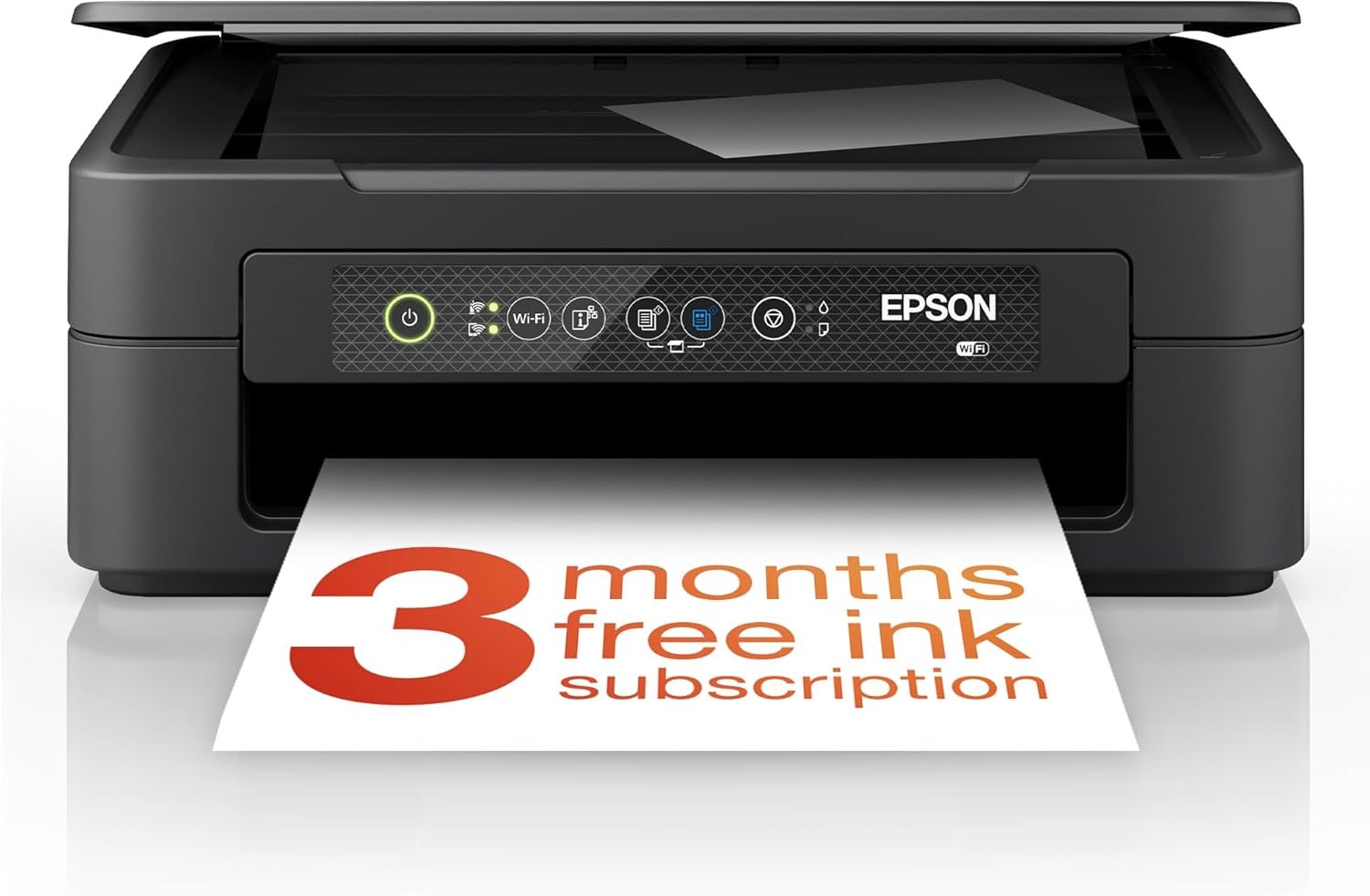 |
3.8/5 (3,328 reviews) | 1440 dpi | 4 ppm | Wi-Fi |
|
| HP Envy 6530e All in One Printer |  |
4.0/5 (1,114 reviews) | 4800 x 1200 dpi | 7 ppm | Wi-Fi |
|
| Canon PIXMA TR4755i Wireless 4-in-1 Printer |  |
4.2/5 (599 reviews) | 4800 x 1200 dpi | 4.4 ppm | USB, Wi-Fi |
|
This Roundup is reader-supported. When you click through links we may earn a referral commission on qualifying purchases.


